


About This Course
Whether you're brand new to Trimble Business Center or simply not yet using it to its full potential, this course will help you process, manage, and deliver survey data with greater confidence and consistency.
The training focuses on core fundamentals and workflows commonly used with a wide range of survey data. Course datasets will include total station, GNSS/RTK, and introductory static GNSS post-processing exercises. You'll leave with repeatable workflows and the QA/QC habits that matter most in professional practice.
What You Gain
- ✓ Understanding and navigating TBC's user interface
- ✓ Working with views and spreadsheets
- ✓ Reports and documentation
- ✓ Core functions, including project creation, general settings, import & export
- ✓ Quality analysis & basic data editing tools
- ✓ Creation of quality deliverables using common survey data
Who Should Attend
This course is designed for geospatial professionals and surveyors who are new to Trimble Business Center, or who have not yet fully integrated TBC into their daily workflows. It's ideal for anyone in land surveying, engineering, or construction layout who wants to establish a more structured, repeatable approach to survey data processing.
Both experienced professionals looking to refine their skills and newcomers eager to build confidence with modern survey data management tools will benefit from this course.
📍 Anaheim, CA
8:00 AM – 5:00 PM each day
CSDS Anaheim
2259 Vía Burton
Anaheim, CA 92806
📍 Sacramento, CA
Sacramento Regional Builders Exchange (SRBX)
Five Star Bank Board Room
5370 Elvas Avenue
Sacramento, CA 95819
Course Agenda
Hot beverages, refreshments, and lunch will be provided.
Day 1
| Time | Topics |
|---|---|
| 8:00 – 8:30 AM | Welcome and Preliminary
|
| 8:30 – 9:00 AM | Introduction to Trimble Business Center
|
| 9:00 – 10:00 AM | The TBC User Interface
|
| 10:00 – 10:15 AM | Break |
| 10:15 – 11:00 AM | Creating TBC Projects
|
| 11:00 AM – 12:00 PM | Exercise 1 — Total Station Topo Job Processing
|
| 12:00 pm - 1:00 pm | Lunch Break |
| 12:00 AM – 1:30 PM | Exercise 1 Continued
|
| 1:30 AM – 2:30 PM | Exercise 2 — Feature Code Processing & Use
|
| 2:30 – 2:45 PM | Break |
| 2:45 – 3:45 PM | Exercise 3 — Simple Traverse Adjustment
|
| 3:45 – 4:30 PM | Day 1 Wrap-up, Assessment & Q&A |
Day 2
| Time | Topics |
|---|---|
| 8:00 – 8:45 AM | Preliminary
|
| 8:45 – 10:00 AM | Exercise 1 — Working with RTK Data
|
| 10:00 – 10:15 AM | Break |
| 10:15 – 11:15 AM | Exercise 2 — Getting Started with Raw GNSS Data
|
| 11:15 – 12:00 AM | Exercise 3 — Local Site Settings (Grid & Ground)
|
| 12:00 pm - 1:00 pm | Lunch Break |
| 1:00 AM – 2:30 PM | Exercise 4 — Introduction to Baseline Processing
|
| 1:30 AM – 2:30 PM | Exercise 5 — Continuously Operating Reference Stations (CORS) Post-Processing & Use
|
| 2:30 – 2:45 PM | Break |
| 2:45 – 3:45 PM | Field → Office → Field Workflows Using Trimble Connect
|
| 3:45 – 4:30 PM | Closing, Student Assessment & Certificate of Course Completion
|
Course Fee
$700
$600
Active CSDS Geospatial Support Plan customers qualify for a special price. Confirm your plan eligibility at registration.
Your Instructor
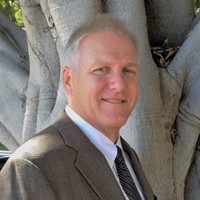
Greg Hazelquist
Technical Support Specialist, Geomatics
Greg has worked in Surveying and Mapping since 1998, beginning his career with Sokkia Corporation before joining Leica Geosystems’ National Technical Staff (2002–2016). In 2016, he joined Trimble Distributor Allen Instruments as Lead Training and Support Specialist and now continues in technical training and support with Cansel/CSDS.
His experience spans field surveying across the Western and Eastern U.S. and as a professional educator from elementary to college level. In 1996, he founded a GPS training and consulting business, leading to a Senior Lead Instructor role in a military program training U.S. Navy and Marine Corps pilots in airborne GPS operations.
Greg holds a bachelor’s degree in Earth Science from CSU Northridge and is a registered LSIT in California. He is a Trimble-certified trainer for GNSS, Total Station, and TBC software, and lives in San Diego with his wife, Laurie.
Your Instructor
- Registration: Please complete the registration form to reserve your spot. Each participant must submit their own form.
- Class Size: Class size is intentionally kept small, ensuring every attendee receives meaningful, personalized attention and guidance from the instructor. Register early to secure your seat!
- Certificate: A Certificate will be issued upon successful course completion — a proof of learning you can be proud of and a valuable addition to your professional credentials.
- What to Bring: A personal computer that meets TBC's minimum system requirements. On-site Wi-Fi will be provided.